 Joymista
FOREX HEATMAP
A market heatmap
Each box is an asset: green rose, red fell, and the stronger the colour the bigger the move. Switch between forex, stocks and crypto, and pick the period: day, week or month. In crypto a box’s size follows the coin’s market value.
Open the tool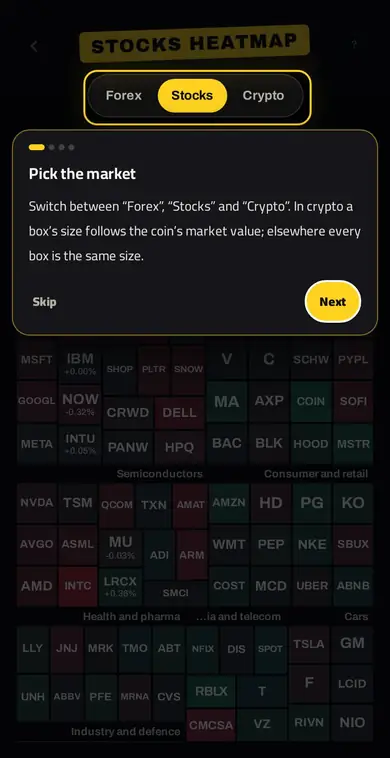
How to use it
- The whole market at a glanceEach box is an asset: green went up, red went down, and the stronger the colour the bigger the move. The boxes are grouped into sections.
- Pick the marketSwitch between “Forex”, “Stocks” and “Crypto”. In crypto a box’s size follows the coin’s market value; elsewhere every box is the same size.
- Pick the periodShow the price change over the day, week or month; the line under the map says exactly which price we compare with.
- The colour scaleIt shows at what percentage a box turns fully green or fully red. A grey box means little movement or no data.
- Tap any boxIt opens the asset card: a simple note about it, its trading hours, and a “Go to the chart” button to carry on your analysis.
Why it helps
A heatmap answers in a second: is the whole market rising, or is one sector leading? Is the dollar strong against everything or just one currency? That picture helps you pick the strongest or weakest asset instead of flipping through dozens of charts.
FAQ
What is a stock heatmap?
A visual that groups stocks into boxes by sector and colours each box green or red by its change, so you see where gains and losses are concentrated.
Is there a crypto heatmap?
Yes. Pick “Crypto” in the tool; each box’s size follows the coin’s market value.
What does a grey box mean?
Very little movement, or no data for that asset in the chosen period.
Related tools
Try it in Joymista
Signing up is free, some tools are free, and one subscription unlocks the rest.
Open the toolEducational content, not investment advice.