 Joymista
MARKET OVERVIEW
The whole market on cards
Each card is one asset: its price now, its change, a small chart of its recent move and whether its market is open or closed. Tabs split assets into groups such as currencies, metals, indices or sectors, with separate versions for forex, stocks and crypto.
Open the tool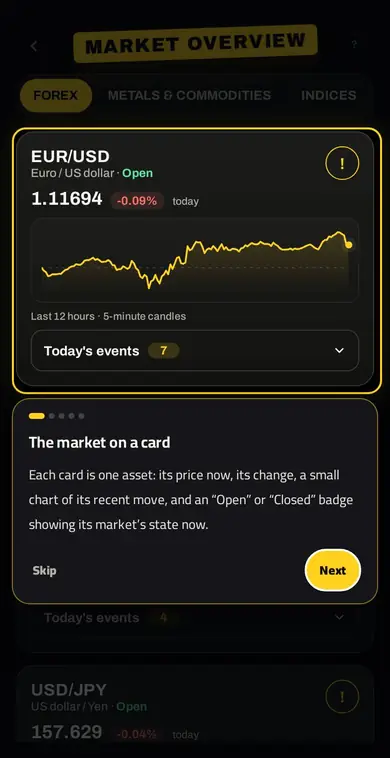
How to use it
- The market on a cardEach card is one asset: its price now, its change, a small chart of its recent move, and an “Open” or “Closed” badge showing its market’s state now.
- Pick a groupThe tabs split the assets into groups for this market, such as currencies, metals, indices or sectors. Tap a tab to see its assets.
- Price and changeA green number means the price rose, a red one that it fell. The line under the chart tells you the period the chart covers.
- Know the assetTap “!” to read a simple note about the asset and its trading hours, and jump to the chart with “Go to the chart”.
- Today’s eventsThe number is how many economic news events are scheduled today for this pair’s currencies. Open it to see each one’s time and impact before you trade.
Why it helps
Before any analysis it helps to see the whole picture: what is moving today and what is quiet. In the forex version each pair shows how many economic events are scheduled today for its two currencies, so you know which pair may move hard before you enter.
FAQ
What does the tool show?
Forex pairs, metals and indices; the world’s main stock markets and sectors; and the top crypto coins by sector, with their change and market state.
Can I open the chart from a card?
Yes. Tap “!” for a short note on the asset and its trading hours, and “Go to the chart” to open it on the Joymista chart.
What is the number next to a pair?
How many economic events are scheduled today for the pair’s currencies; open it to see each event and its time.
Related tools
Try it in Joymista
Signing up is free, some tools are free, and one subscription unlocks the rest.
Open the toolEducational content, not investment advice.